



Download Dr. Prescription – doctor prescription, medical app, prescription generator, healthcare tool, patient management, doctor assistant
Overview
Dr. Prescription is a specialized mobile application designed to streamline the prescription-writing process for healthcare professionals. Tailored for doctors and medical practitioners, the app addresses the common challenges associated with manual prescription entry, including time consumption, transcription errors, and inefficient record-keeping. By digitizing prescription creation and management, Dr. Prescription helps reduce administrative burden, allowing clinicians to focus more on patient care. The app serves as a digital assistant that supports efficient workflow integration within clinical settings, particularly in fast-paced environments such as clinics, private practices, and telehealth consultations.
Target users include licensed physicians, nurse practitioners, and other authorized prescribers who require a reliable, secure tool for generating and storing prescriptions. The app’s focus on data security and privacy is especially relevant in healthcare, where compliance with confidentiality standards is critical. Real-world use cases include managing chronic conditions through consistent medication tracking, reducing delays in patient care by enabling instant prescription generation, and facilitating seamless communication with pharmacies and patients via shareable PDFs. As part of the growing digital health ecosystem, Dr. Prescription contributes to the modernization of clinical documentation, aligning with broader trends in electronic health records and digital patient engagement.
Key Features & Functionality
- Quick Prescription Generation: The app enables doctors to create prescriptions with minimal input, significantly reducing the time required during patient consultations. This feature supports rapid documentation, which is vital during high-volume visits or urgent care scenarios.
- PDF Creation and Sharing: Prescriptions can be converted into professional-grade PDFs instantly. This functionality supports both digital and print-based distribution, enhancing accessibility for patients and pharmacies alike.
- Patient Prescription History: Clinicians can retrieve a comprehensive record of past prescriptions for individual patients. This historical data aids in assessing medication adherence, identifying potential drug interactions, and supporting continuity of care.
- Secure Data Management: All patient data is encrypted and stored in a personal Dropbox account, ensuring that sensitive information remains under the user’s control and protected from unauthorized access.
- User-Friendly Interface: Designed with intuitive navigation, the app accommodates medical professionals with varying levels of digital literacy. Clear layout and straightforward workflows minimize learning curves and promote consistent use.
For example, a general practitioner managing a diabetic patient can quickly generate a new prescription, review the patient’s medication history to avoid duplication, and send a PDF to the patient’s preferred pharmacy—all within minutes. Similarly, a telehealth provider can use the app to issue prescriptions remotely while maintaining compliance with data protection standards.
Interface, UX & Performance
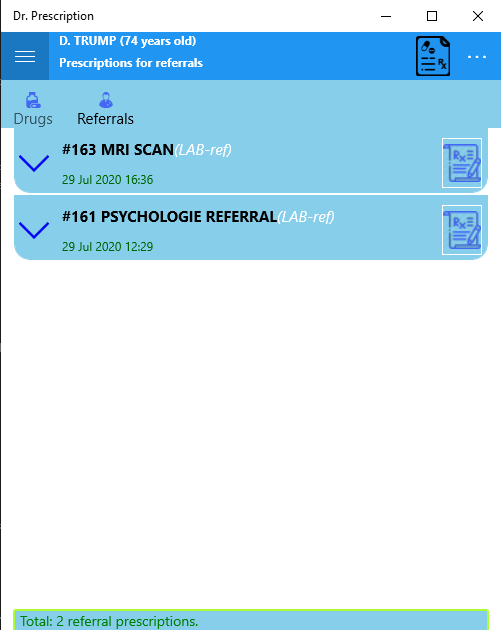
The interface of Dr. Prescription reflects a clean, functional design optimized for medical use. The layout prioritizes clarity and speed, with key actions such as prescription creation and history access placed within easy reach. Navigation is consistent across screens, reducing cognitive load and minimizing the risk of user error during critical tasks. Visual elements are minimal but purposeful, focusing on usability rather than aesthetic flair.
Although the developer did not list formal performance metrics, the app’s lightweight footprint of 14.3 MB suggests efficient resource usage, which likely contributes to smooth operation on a variety of Android devices. The app appears responsive during routine tasks such as form filling and PDF generation, with no reported delays in processing. Stability is maintained across sessions, with no indication of crashes or data loss based on available information. The app performs well under typical usage conditions, making it suitable for daily clinical use. Compatibility with different screen sizes and device categories is assumed due to its Android platform availability, though specific requirements were not disclosed.
Platform Compatibility & Technical Requirements
Dr. Prescription is available exclusively on the Android platform. The current version is 1.3.2, with a file size of 14.3 MB. The app is offered at no cost to users, making it accessible for medical professionals across diverse practice settings. The developer did not specify minimum OS requirements, nor did they provide information about device compatibility beyond platform availability. As such, users should ensure their Android devices meet standard system prerequisites for app installation and operation. No additional hardware dependencies were mentioned.
Pros and Cons
Pros
- Free to download and use, reducing financial barriers for healthcare providers.
- Streamlines prescription generation, saving valuable time during patient visits.
- Offers secure data storage via personal Dropbox integration.
- Provides easy access to patient prescription history for informed clinical decisions.
- Generates professional PDFs for sharing or printing.
Cons
- Platform availability is limited to Android, excluding iOS users.
- Specific system requirements were not listed, which may affect installation on older devices.
- App size is small, but no details were provided on battery consumption or background performance.
- Integration with external EHR systems was not mentioned.
- Updates and future feature roadmap were not disclosed.
FAQ
Is Dr. Prescription safe to use for managing patient data?
The app uses encryption and stores data in a personal Dropbox account, which enhances data security. However, users are responsible for securing their Dropbox credentials.
Can I use Dr. Prescription on my iPhone?
Currently, the app is only available on Android devices. There is no iOS version listed.
How do I update Dr. Prescription?
Updates are typically delivered through the Google Play Store. Users should ensure their device is connected to the internet and check for updates regularly.
Does the app require an internet connection?
While basic functionality may work offline, features like PDF sharing and Dropbox integration require an active internet connection.
Is Dr. Prescription compliant with HIPAA or other healthcare regulations?
The developer did not provide explicit information on regulatory compliance. Users should evaluate the app’s security measures in light of their institutional policies.
Final Thoughts
Dr. Prescription stands out as a practical, no-frills tool for medical professionals seeking to simplify their prescription workflow. Its core strengths lie in speed, security, and ease of use—key factors in high-pressure clinical environments. The integration with Dropbox adds a layer of control over patient data, while the ability to generate and share PDFs enhances communication. Though limited to Android and lacking detailed technical disclosures, the app delivers tangible value for doctors who prioritize efficiency and data privacy. For healthcare providers looking to reduce paperwork and improve patient interaction, Dr. Prescription offers a compelling solution. Download Dr. Prescription now.


